I spent a bit of time thinking about export formats in Edit Credits.Not in a “let’s add every codec in the world” way — more like: what would actually be useful when someone finishes their end credits and needs to move them further down the production... Read more
I spent a bit of time thinking about export formats in Edit Credits.
Not in a “let’s add every codec in the world” way — more like: what would actually be useful when someone finishes their end credits and needs to move them further down the production chain?
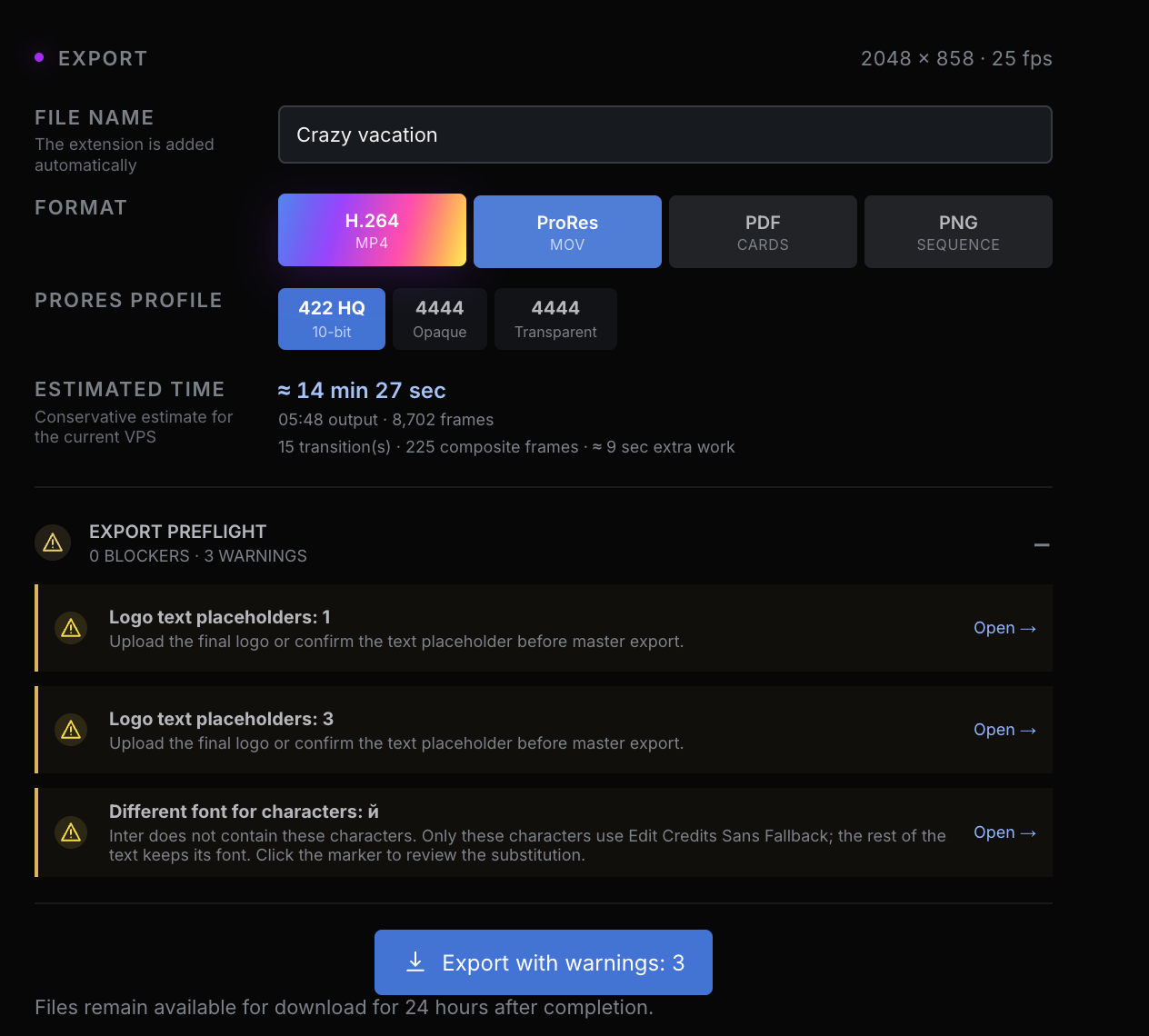
So for now I ended up with four export options.
H.264 is there mostly for review. It’s light, quick to share, and good enough if you just want to drop the credits into a timeline, send a preview, or check that everything feels right without downloading a huge file.
ProRes is the serious one. That’s the format I expect people to use when they want to bring the credits into Premiere, Resolve, Avid, After Effects, etc. It’s a proper post-production format, and it also gives me room to support alpha channel workflows where that matters.
PDF is a slightly different thing. It’s not a final video export — it’s more of an approval document. Something you can send around, comment on, print, or even attach somewhere if the credits need to be reviewed as a document. I also made it work sensibly for longer rolls, so the PDF can become a long readable page instead of trying to pretend everything is a normal video frame.
PNG sequence is probably the least “everyday” option, but I still wanted to keep it. Some people prefer image sequences for motion graphics workflows, especially in After Effects or more custom pipelines. I don’t expect it to be the most popular export, but I know there are cases where it’s simply the cleanest way to move frames around.
I also deliberately didn’t add DNxHD / DNxHR yet. I did think about it, and I’m not against it at all. But since ProRes is already widely supported and easy to convert from if needed, I’d rather wait until someone actually asks for DNx before adding another export path just for the sake of having it.
The other small thing I’m happy with is the export preflight check. Before rendering, Edit Credits now tries to point out obvious problems: missing logo files, text placeholders, text getting outside the safe area, font fallback issues, and similar little traps.
The goal is simple: if the export is going to take time, I’d rather warn you before it starts than let you discover the problem after the file is rendered.
Still public beta, still evolving — but this part is starting to feel like a real workflow now.
And that’s a very nice feeling. 🙂
Not in a “let’s add every codec in the world” way — more like: what would actually be useful when someone finishes their end credits and needs to move them further down the production chain?
So for now I ended up with four export options.
H.264 is there mostly for review. It’s light, quick to share, and good enough if you just want to drop the credits into a timeline, send a preview, or check that everything feels right without downloading a huge file.
ProRes is the serious one. That’s the format I expect people to use when they want to bring the credits into Premiere, Resolve, Avid, After Effects, etc. It’s a proper post-production format, and it also gives me room to support alpha channel workflows where that matters.
PDF is a slightly different thing. It’s not a final video export — it’s more of an approval document. Something you can send around, comment on, print, or even attach somewhere if the credits need to be reviewed as a document. I also made it work sensibly for longer rolls, so the PDF can become a long readable page instead of trying to pretend everything is a normal video frame.
PNG sequence is probably the least “everyday” option, but I still wanted to keep it. Some people prefer image sequences for motion graphics workflows, especially in After Effects or more custom pipelines. I don’t expect it to be the most popular export, but I know there are cases where it’s simply the cleanest way to move frames around.
I also deliberately didn’t add DNxHD / DNxHR yet. I did think about it, and I’m not against it at all. But since ProRes is already widely supported and easy to convert from if needed, I’d rather wait until someone actually asks for DNx before adding another export path just for the sake of having it.
The other small thing I’m happy with is the export preflight check. Before rendering, Edit Credits now tries to point out obvious problems: missing logo files, text placeholders, text getting outside the safe area, font fallback issues, and similar little traps.
The goal is simple: if the export is going to take time, I’d rather warn you before it starts than let you discover the problem after the file is rendered.
Still public beta, still evolving — but this part is starting to feel like a real workflow now.
And that’s a very nice feeling. 🙂