Still building my end credits editor, and this week I fell into the surprisingly deep world of rolling credits. 🎬
It sounds simple: text moves from bottom to top. What could go wrong?
Quite a lot, apparently. At the wrong speed, credits can judder, flicker or simply feel uncomfortable to watch.... Read more
Still building my end credits editor, and this week I fell into the surprisingly deep world of rolling credits. 🎬
It sounds simple: text moves from bottom to top. What could go wrong?
Quite a lot, apparently. At the wrong speed, credits can judder, flicker or simply feel uncomfortable to watch. 😵💫
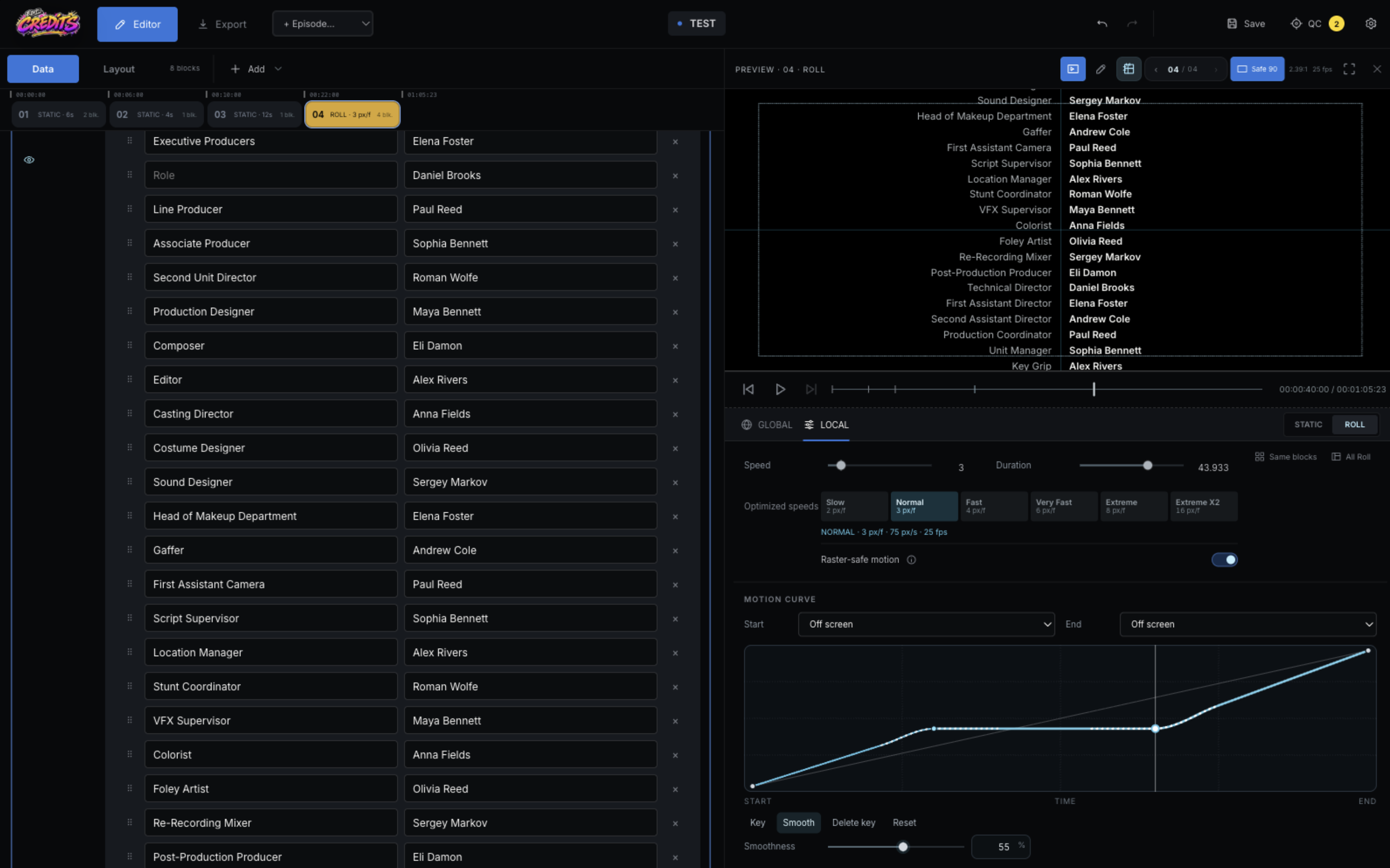
After a lot of reading and testing, I added ready-made speed modes that adapt to the project’s frame rate and resolution. Instead of searching for a magic number, you can choose Slow, Normal, Fast or one of the quicker options.
I also built a visual motion curve. You can add keyframes, slow down a section, create a pause, or make the movement start and stop more smoothly. 📈
The results look good across the frame rates and resolutions I’ve tested so far. But motion is full of tiny details, and I definitely don’t want to pretend I’ve solved all of them. 😅
If you’ve worked with rolling credits and have any tricks, rules or painful lessons, I’d genuinely love to hear them. Maybe we can make this tool better together. 🙌
It sounds simple: text moves from bottom to top. What could go wrong?
Quite a lot, apparently. At the wrong speed, credits can judder, flicker or simply feel uncomfortable to watch. 😵💫
After a lot of reading and testing, I added ready-made speed modes that adapt to the project’s frame rate and resolution. Instead of searching for a magic number, you can choose Slow, Normal, Fast or one of the quicker options.
I also built a visual motion curve. You can add keyframes, slow down a section, create a pause, or make the movement start and stop more smoothly. 📈
The results look good across the frame rates and resolutions I’ve tested so far. But motion is full of tiny details, and I definitely don’t want to pretend I’ve solved all of them. 😅
If you’ve worked with rolling credits and have any tricks, rules or painful lessons, I’d genuinely love to hear them. Maybe we can make this tool better together. 🙌