🎬 I’m currently in a competition for an AI video. I thought I’d share the behind the scenes timeline.👍 If anyone drops a like on this YouTube video between now and Sunday, it improves my chances with the competition.youtu.be/i5XIWqdpQNU?is…🎞️ All the shots were generated with IPVISE.A moving version of the timeline that replays along with the video can be viewed here:Read more
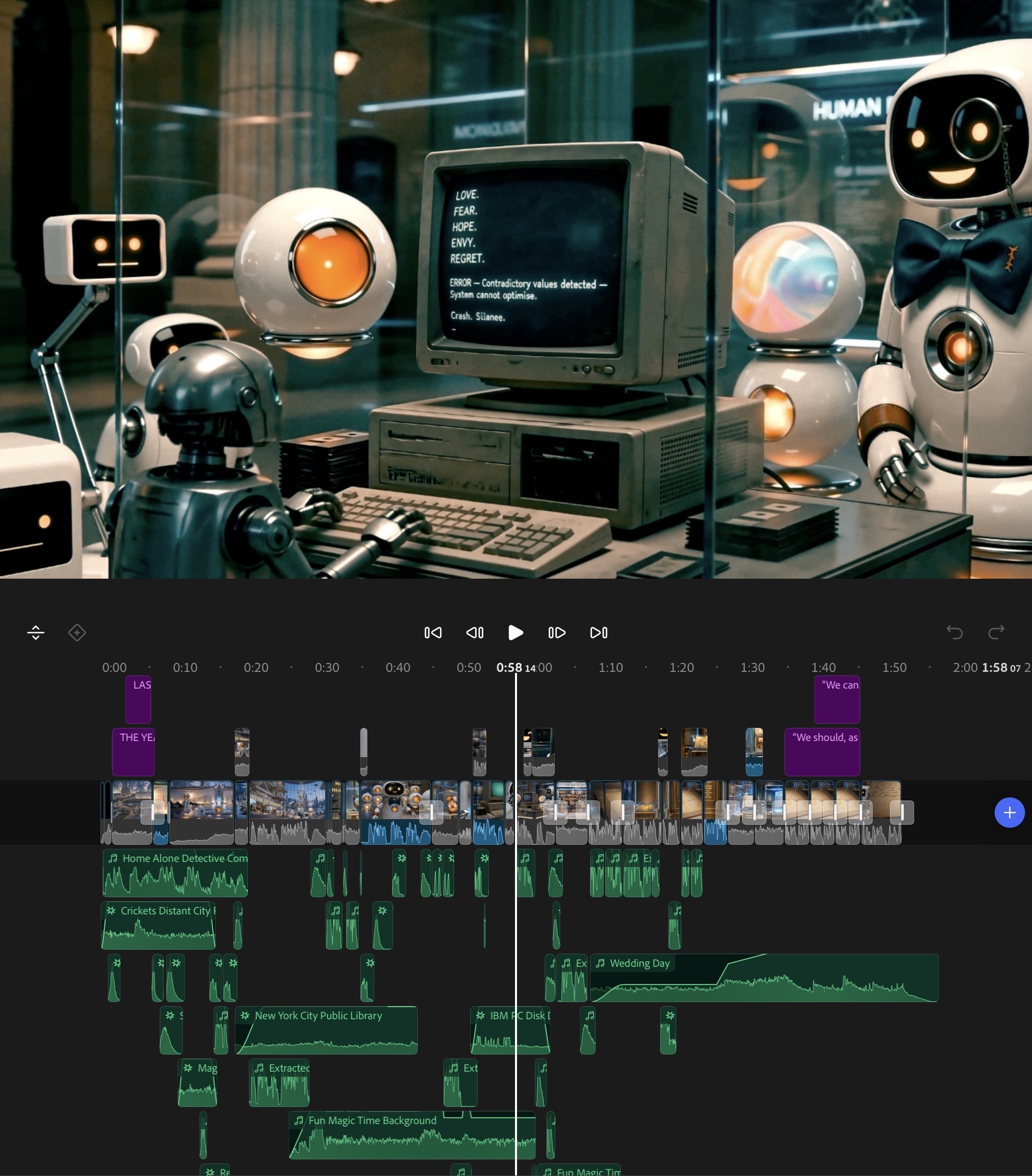
🎬 I’m currently in a competition for an AI video. I thought I’d share the behind the scenes timeline.
👍 If anyone drops a like on this YouTube video between now and Sunday, it improves my chances with the competition.
youtu.be/i5XIWqdpQNU?is…
🎞️ All the shots were generated with IPVISE.
A moving version of the timeline that replays along with the video can be viewed here:
https://lnkd.in/p/eZBzgVWY
📋 The workflow was roughly this:
1.✍️ Write the script.
2.🎨 Use IPVISE image generators to create all the characters. Keep iterating until happy.
3.📐 Create character sheets for all of these from many angles.
4.🎤 Work on voice for the main curator character. I wanted it to be robotic but also a bit playful.
5.🌍 Generate stills of the environments. Create a lot of detailed ones from many angles.
6.🎬 Use IPVISE infinite canvas node based workspace to create the video shots.
7.📹 Drop them onto the timeline, add music and effects.
8.✂️ Keep working on the edit and start generating extra cutaway shots to add even more humour. This refining can be a long process.
9.🔧 I needed to add and tweak many shots. I also needed to change some of the dialogue. I’d typically need a new cutaway to cover the join.
10.🎵 Do a final polish and audio mix.
11.📱 Export, play it on many different devices, because it can sound different on headphones or a TV. Make sure it works everywhere.
12.✨ Do final tweaks and final export.
💙 Again, anyone that drops a like on this video helps me with the competition, and it would be massively appreciated.
youtu.be/i5XIWqdpQNU?is…
👍 If anyone drops a like on this YouTube video between now and Sunday, it improves my chances with the competition.
youtu.be/i5XIWqdpQNU?is…
🎞️ All the shots were generated with IPVISE.
A moving version of the timeline that replays along with the video can be viewed here:
https://lnkd.in/p/eZBzgVWY
📋 The workflow was roughly this:
1.✍️ Write the script.
2.🎨 Use IPVISE image generators to create all the characters. Keep iterating until happy.
3.📐 Create character sheets for all of these from many angles.
4.🎤 Work on voice for the main curator character. I wanted it to be robotic but also a bit playful.
5.🌍 Generate stills of the environments. Create a lot of detailed ones from many angles.
6.🎬 Use IPVISE infinite canvas node based workspace to create the video shots.
7.📹 Drop them onto the timeline, add music and effects.
8.✂️ Keep working on the edit and start generating extra cutaway shots to add even more humour. This refining can be a long process.
9.🔧 I needed to add and tweak many shots. I also needed to change some of the dialogue. I’d typically need a new cutaway to cover the join.
10.🎵 Do a final polish and audio mix.
11.📱 Export, play it on many different devices, because it can sound different on headphones or a TV. Make sure it works everywhere.
12.✨ Do final tweaks and final export.
💙 Again, anyone that drops a like on this video helps me with the competition, and it would be massively appreciated.
youtu.be/i5XIWqdpQNU?is…